
App-controlled feeders cost 30-50% more than basic timed feeders. We break down when that extra cost provides real value for your cat, and when a non-wifi feeder is actually the more reliable choice.

The Core Difference Explained
At a mechanical level, Wi-Fi and non-Wi-Fi feeders are nearly identical. Both use an internal motor to turn an auger or wheel that dispenses dry kibble from a hopper into a bowl.
The difference is entirely in how you control it and what data you get back.
Non-Wi-Fi (Standard Timed Feeders): You program the schedule using physical buttons and an LCD screen on the device itself. It operates completely independently of your home network.
Wi-Fi (App-Controlled Feeders): You program the schedule via a smartphone app. The feeder connects to your home Wi-Fi network to receive instructions and send back data. Many include a camera or two-way audio.
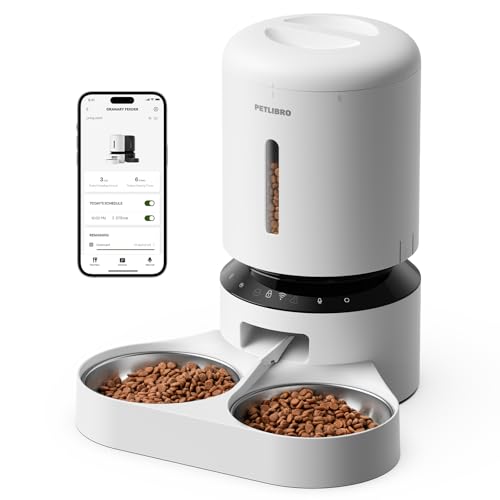
PETLIBRO 5L Automatic Cat Feeder, Smart App Control Timed Cat Feeder with 5G/2.4G WiFi
When a Wi-Fi Feeder Is Worth the Extra Cost
An app-controlled feeder genuinely improves the feeding experience in these specific scenarios:
1. You Travel Frequently
If you’re away from home multiple days a month, the ability to open an app and confirm “yes, breakfast dispensed successfully at 7:00 AM” provides massive peace of mind. Without Wi-Fi, you’re trusting the machine blindly until you return.
2. Your Cat’s Schedule Needs Frequent Changes
Programming a standard feeder with physical buttons is notoriously tedious — it feels like setting a digital watch from 1995. If you work shift hours and need to adjust feeding times weekly, doing it in an app takes 10 seconds. Doing it on the machine takes 3 frustrating minutes.
3. You Have a Fast Eater or Anxious Cat
The “Manual Dispense” button on an app is invaluable. If your cat finishes their meal and is begging 20 minutes early, or if you’re delayed coming home, you can dispense a small 1/12 cup snack remotely to calm them down without altering the main schedule.
4. You Want to Monitor Eating Habits
Camera-equipped Wi-Fi feeders let you check if your cat actually ate the food that dispensed. This is critical for monitoring health in senior cats or managing diets in multi-cat households (seeing which cat ate the meal).
See top-rated Wi-Fi App-Controlled Feeders
When a Non-Wi-Fi Feeder Is the Better Choice
Surprisingly, there are several situations where a standard “dumb” feeder is not just cheaper, but actually superior:
1. You Want Maximum Reliability
A non-Wi-Fi feeder has fewer points of failure. If your router reboots, your internet goes down, or the manufacturer’s cloud server crashes, a standard feeder doesn’t care. It runs on its internal clock. For absolute reliability, mechanical independence wins.
2. You Have Spotty Home Wi-Fi
If the room where you plan to put the feeder has weak Wi-Fi, an app feeder will be a constant source of frustration. It will drop offline and fail to sync schedule changes. A standard feeder completely bypasses this limitation.
3. You Value Privacy
Camera-equipped IoT devices inside your home present a privacy surface area. If you’re uncomfortable with an internet-connected camera and microphone running 24/7 in your kitchen or living room, a standard feeder is the secure choice.
4. You Want to “Set It and Forget It”
If your cat eats the exact same amount at the exact same times every day of the year, the app provides very little ongoing value after the initial 5-minute setup. Why pay for connectivity you won’t use?
See top-rated standard Timed Auto Feeders
The Wi-Fi Feeder Risk Nobody Mentions: App Abandonment
When you buy a standard feeder, you own 100% of the functionality. When you buy a Wi-Fi feeder, you are leasing the remote control capability.
If a manufacturer decides to stop paying for cloud servers, or removes their app from the App Store, your “smart” feeder becomes a very expensive paperweight (or at best, reverts to whatever schedule was last saved locally).
How to protect yourself:
- Buy Wi-Fi feeders from established brands (PETLIBRO, PetSafe, WOPET) rather than generic brands that might disappear in 6 months.
- Before buying, check that the feeder has a Local Schedule Mode — meaning the schedule is saved directly to the device’s memory. If the internet drops, the feeder should continue to dispense on time. (We track this in our rankings).
The Verdict: Which Should You Buy?
Buy a Wi-Fi Feeder if: Your budget allows the $70–$150 price range, you travel often, you enjoy tech convenience, or you need to visually confirm your cat is eating while you’re at work.
Buy a Non-Wi-Fi Feeder if: You want bulletproof reliability, your budget is under $60, you have a set routine that rarely changes, or you don’t want another internet-connected device to manage.
For most modern pet owners, a basic Wi-Fi feeder (without a camera) hits the sweet spot: you get the ease of app programming and peace-of-mind notifications, without the privacy concerns or high cost of a camera model.
Compare the top models in both categories: App-Controlled Feeders vs Automatic Timed Feeders.
This post contains affiliate links. We may earn a commission when you purchase through our links at no extra cost to you.