Many app feeders fail after firmware updates, lose Wi-Fi connectivity, or have apps that get discontinued. We analyzed 6,800+ reviews to identify which app-controlled feeders are genuinely reliable — and which ones fail quietly.
The App Feeder Problem Nobody Talks About
An app-controlled cat feeder sounds like the ideal solution: feed your cat from anywhere, monitor eating habits, check in via camera. But a specific failure mode affects this category more than any other: app abandonment.
Smaller manufacturers release a feeder, ship a companion app, then stop maintaining the app when they update to a new product line. The feeder still works as a standalone device, but remote control features fail — silently, without warning — when the manufacturer sunsets their cloud servers.
This has happened to multiple brands in our review database. Buyers who purchased a feeder with a 4.5-star average 2 years ago now have a device with a non-functional app. Amazon reviews written at purchase time are no longer representative of current reliability.
This guide focuses on how to identify app feeders with durable, reliable software ecosystems — not just good hardware.
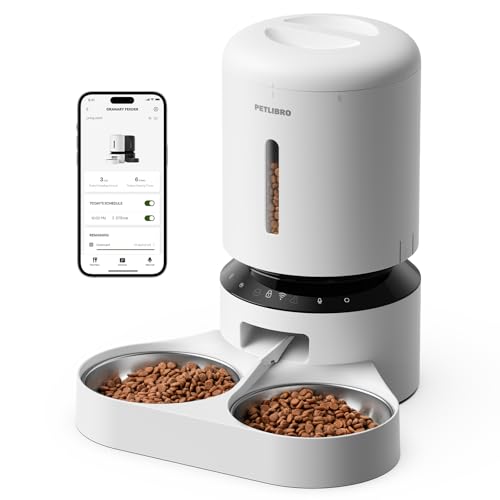
PETLIBRO 5L Automatic Cat Feeder, Smart App Control Timed Cat Feeder with 5G/2.4G WiFi
The Three App Reliability Indicators
1. App Store Update Recency
Before purchasing, check the manufacturer’s app on the App Store or Google Play. Look at:
- Last updated date: App updated within the last 3 months = active maintenance. Last updated over 12 months ago = yellow flag.
- Review response pattern: Does the developer respond to negative app reviews? Active response = active support team.
- iOS and Android rating independently: Some brands maintain one platform better than the other. If the iOS rating is 4.5 and the Android rating is 2.1, you’re looking at a neglected Android build.
2. Offline Schedule Mode (Critical)
This is the most important technical feature for reliability: does the feeder continue its programmed schedule when the app or internet is unavailable?
Two behaviors exist in the market:
- Local schedule: The schedule is stored on the feeder device itself. If Wi-Fi drops or the cloud goes down, scheduled meals still happen. This is robust.
- Cloud-dependent: The feeder queries the cloud server for its schedule. If the cloud is unreachable, meals may not dispense. This is fragile.
Many product listings don’t clearly state which behavior applies. Search Amazon reviews for “power outage,” “Wi-Fi down,” or “offline” to find real-world reports of what happens during connectivity failures.
3. Brand Longevity and Market Presence
Established brands with multiple product lines across multiple years have more to lose from abandoning software support. Single-product brands with no product history are higher risk.
This doesn’t mean new brands are bad — it means the due diligence is higher. Look for clear statements about app support commitments, not just marketing copy.
What Genuine App Feeder Value Looks Like
When an app feeder is working as intended, these are the features that deliver real value:
Remote manual dispense: Feed your cat from your phone when you’re traveling. This also lets you add an extra meal if your schedule changes without reprogramming the device.
Feeding history log: See exactly when each meal dispensed, and whether your cat ate from the bowl within a reasonable window. If the log shows a scheduled meal but your cat didn’t eat for 4 hours afterward, that’s a signal worth knowing.
Low food level alert: Pushes a notification when the hopper is running low. Particularly useful for multiple-cat households where food consumption rate is higher.
Camera integration: Watch your cat eat in real time, or check if food is still in the bowl from a previous meal. Some cameras detect motion and send alerts when your cat approaches.
Two-way audio: Rarely used, but lets you “talk” to your cat via the speaker while you’re away. Reviewed as novelty by most, genuinely useful for cats with separation anxiety.
What App Feeders Don’t Do Well
- Wet food: Almost all app feeders are designed for dry kibble only. A few refrigerated models exist but are expensive and have more failure modes.
- Extremely small kibble: Pellets under 5mm can clog the dispensing mechanism or fall through gaps, creating accumulated debris that the app cannot detect.
- 100% reliability in poor Wi-Fi environments: Thick walls, crowded networks, or 2.4GHz congestion all affect connectivity. Check that your feeder placement has a reliable signal before committing to the location.
Red Flags in App Feeder Listings
- “Lifetime cloud service guaranteed” without a specific policy document to reference — this claim is unenforceable and typically meaningless
- App reviews mentioning “can’t connect after update” with no developer response in the past 6 months
- Only supports 5GHz Wi-Fi (less common but a real limitation — most home IoT devices require 2.4GHz)
- The “manual” dispense button only works through the app — if the app fails, you can’t manually feed your cat without unplugging and reprogramming
Recommended Check Before Purchase
- Download the companion app before buying the hardware
- Check App Store reviews in the last 30 days specifically (filter by “Most Recent”)
- Look for “offline” or “without internet” mentions in the Q&A section of the Amazon listing
- Confirm the app has been updated in the last 6 months
See our current app-controlled feeder rankings with reliability scores
Frequently Asked Questions
Can I control an app feeder without a subscription?
Most current app feeders include core functionality (schedule, manual dispense, history) for free. Premium subscriptions typically unlock cloud storage for camera footage, extended feeding history, or multi-feeder management. Check before purchase — some brands have shifted to subscription models that lock basic features.
My app feeder says “device offline” randomly. What fixes it?
Common causes: (1) 2.4GHz Wi-Fi interference from neighboring networks — try changing your router’s 2.4GHz channel. (2) The feeder is too far from the router — move it closer or add a Wi-Fi extender. (3) The feeder’s firmware needs updating — check the app’s device settings for a firmware update option.
Is it safe to leave an app feeder unattended for a week?
Yes, if: the feeder has a local offline schedule mode (meals happen without internet), battery backup is installed, and the hopper has sufficient capacity. The camera feature additionally lets you verify your cat is eating normally from anywhere in the world.
My cat’s food consumption looks inconsistent on the app log. Should I be worried?
Check: (1) Is another cat accessing the bowl? (2) Is the meal portion being dispensed but your cat eating it before the next log entry? App feeders log dispense times, not necessarily eating times. Inconsistency in eating timing is common and usually not a concern.
Full rankings with app update history and offline behavior data: App-Controlled Feeder Rankings.
This post contains affiliate links. We may earn a commission when you purchase through our links at no extra cost to you.